YUV420 Color Correction
VirtualDub plugin for RGB-style color correction in YUV420
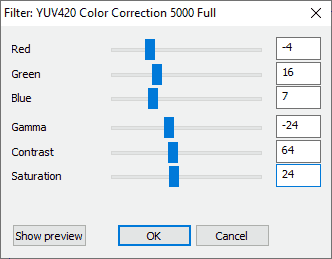
YUV420 Color Correction (5000) is a VirtualDub plugin to adjust colors in YUV420 mode, but in style of RGB controls. There is no internal conversion to RGB and back to YUV420, as is the case with other plugins. For that, it would be a lossy process in which, for example, color transitions become blurred and some sharpness is lost. It remains in YUV420 format. The channels get translated and you can adjust red, green and blue separately. The full version can also adjust gamma, contrast and saturation. I needed it, because I wanted to correct an old MPEG-2 recording shot-by-shot and avoid loss of quality due to re-chroma subsampling. So this plugin only supports BT.601! I tested it in VirtualDub2 32 and 64 Bit. It should also work in older versions.
How i made it?
I had no knowledge in C++ programming. OpenAI's ChatGPT done the most work. It is based on the VirtualDub Plugin SDK v1.2 and was modified in MS Visual Studio 2022 Community Edition. If you want to edit and compile the source code, you must first download the VDPluginSDK-1.2.zip. After that, let Visual Studio convert the project files and then you can copy and replace the source code from my package. It will output a "SampleVideoFilter.vdf". You have to rename the file or edit it in the VS Project. Btw. comments are in German.
The Features:
Adjust Red, Green and Blue separately
Adjust Gamma, Contrast and Saturation (Full version)
Moveable Sliders
Input Fields
Real-time Preview
You can download version 1.0 at Internet Archive